

Notice: Undefined index: filter in /home/fxcbmuxphhyx/public_html/staging.projectpro365.com/product-updates/release-december-2025.php on line 50
Notice: Undefined index: filter in /home/fxcbmuxphhyx/public_html/staging.projectpro365.com/product-updates/release-december-2025.php on line 59
New Releases in this Updates
| Update ID | Type | Title | Functional Area |
|---|---|---|---|
| PE-492 | New Feature | [ADO-461] Draws to Include Sub-Level Projects |
ProjectPro Basics |
| PE-696 | New Feature | [ADO-746] New Feature for Project Cash Flow |
Project Cash Flow |
| PE-730 | Improvement | [ADO-777] Subcontract Master with Change Order |
Subcontract |
| PE-741 | Improvement | [ADO-760] Purchase Posting with Negative Total Amount |
ProjectPro Basics |
| PE-754 | New Feature | [ADO-895] Draws at Contract Project Level |
ProjectPro Basics |
| PE-756 | New Feature | [ADO 999] Add "Detailed Scope of Work" on the Quote Reports |
Project Quote |
| PE-757 | New Feature | [ADO-914] New Column "Retention Posted Sales Invoice" on Progress Billings List |
Progress Billing |
| PE-759 | Enhancement | [ADO-1009] Print Item Name, G/L Name, Resource Name in Variance Report Description |
Reports |
| PE-763 | New Feature | [ADO 1015] Project Forecast on Sub-Level Projects |
Project Forecast |
| PE-767 | Enhancement | [ADO-1109] Rounding G/L Conflict During Foreign Exchange Posting – Incorrect GL Impact |
ProjectPro Basics |
| PE-771 | Enhancement | [ADO-1126] Enhance Project Sales Invoice Report (14021225) |
Reports |
| PE-773 | New Feature | [ADO-1150] “Scope of Work” on Work Order Report |
ProjectPro Basics |
| PE-775 | Enhancement | [ADO-1208] Warning in PMP – Copy Project Planning Lines |
Project Material Planning |
| PRJCTPR-539 | Improvement | [ADO-1044] Vendor Lien Release Document - Printing "UNKONWN!!!" |
ProjectPro Basics |
| PRJCTPR-546 | Improvement | [ADO-1154] Customer Card - Field Value and Lookup for "Balance Without Retention ($)" |
ProjectPro Basics |
| PRJCTPR-547 | Hot Fix | [ADO-1155] Use "Get Receipt Line" after Receiving Subcontract Commitment |
Subcontracts |
| PRJCTPR-548 | Improvement | [ADO-1146] "Bill-to Customer Name" on Change Order Quote |
ProjectPro Basics |
| PE-492 | New Feature | [ADO-461] Draws to Include Sub-Level Projects |
ProjectPro Basics |
| PE-696 | New Feature | [ADO-746] New Feature for Project Cash Flow |
Project Cash Flow |
| PE-730 | Improvement | [ADO-777] Subcontract Master with Change Order |
Subcontract |
| PRJCTPR-549 | Improvement | [ADO-1204] Dimensions on Quote - Template to Quote and Quote to Project |
Project Quote |
| PRJCTPR-550 | Improvement | [ADO-1196] Char Length on "Project Purchase Order Status" Report (14021184) |
Reports |
| PRJCTPR-554 | Improvement | [ADO-1289] Progress Payment - Increase Character Length for "Vendor Name" |
Subcontracts |
Note: Details are given below in “Release Note Details”.
Release Note Details
PE-492/ADO-461
New Feature – Draws to Include Sub-Level Projects
This covers the scenarios for the Master Project being created directly rather than through the Contract Project. All other details and functionality remain the same as described in PE-754/ ADO895.
PE-735/ADO-746
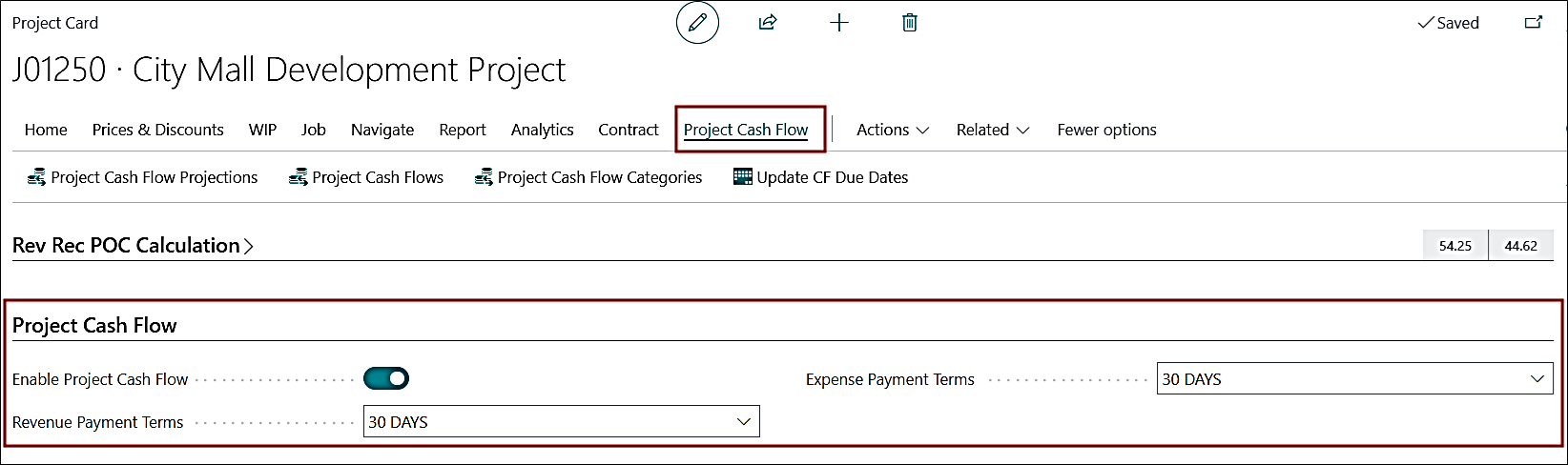
New Feature – New Feature for Project Cash Flow
A new “Project Cash Flow” feature has been introduced to provide clear visibility of cash inflow and outflow at the project level, helping users track planned and actual cash movement more effectively.
PE-730/ADO-777
Enhancement – Subcontract Master with Change Order
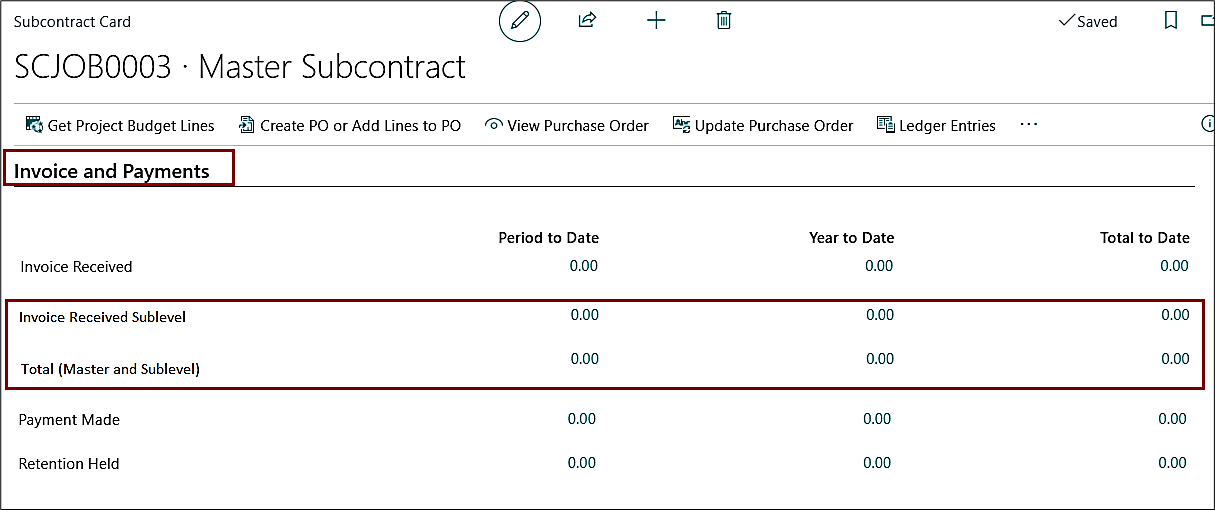
Subcontract values are now calculated at the individual subcontract level instead of cumulative totals. The Vendor Ledger Entry lookup now shows all related entries for the selected subcontract.
Two new fields have been added under “Invoicing and Payments” fast tab:
- Invoice Received Sublevel – Shows invoice amounts for all sublevel subcontracts.
- Total (Master + Sublevel) – Shows the combined invoice total of master and sublevel subcontracts.
PE-741/ADO-760
Enhancement – Purchase Posting with Negative Total Amount
Restriction has been added in case of posting a Purchase Order or Purchase Invoice or Purchase Credit Memo, or Blanket Purchase Order when the total amount is negative, same as how the base Business Central behaves.
PE-754/ADO-895
New Feature – Draws at Contract Project Level
1. Automatic Draw Synchronization
Draws will now sync automatically through the project structure.
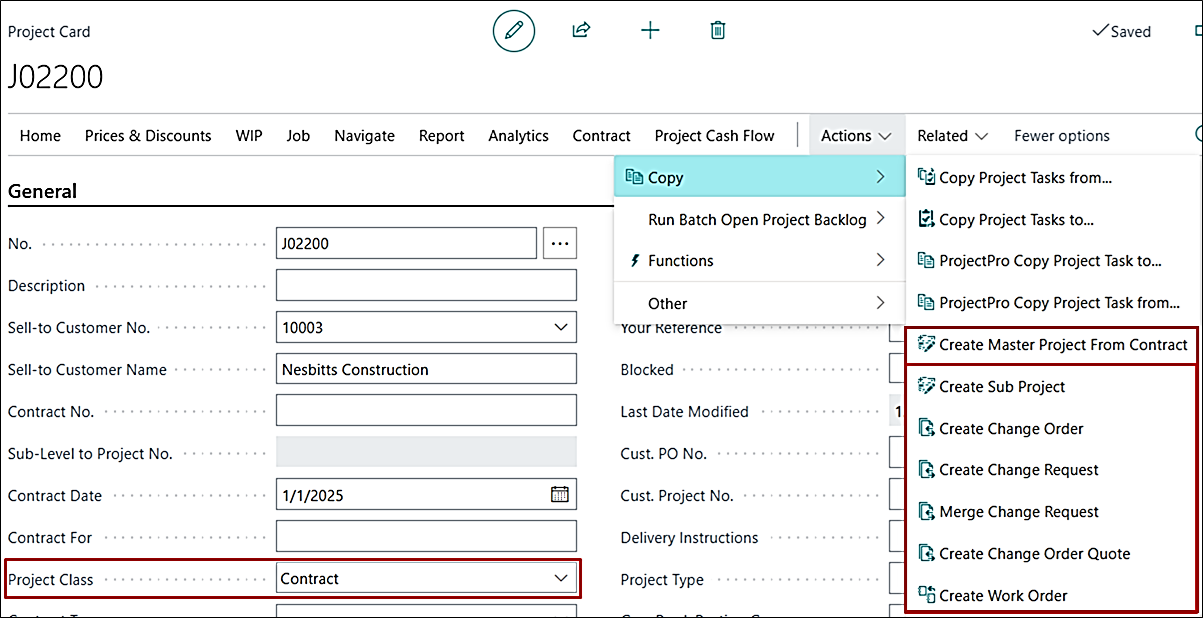
- When a Sub-Level project (Master, Sub Project, Change Order, Work Order) is created from a
Contract card:
- All open draws from the Contract project will automatically copy to the new project.
- If the Sub-Level project (Master, Sub Project, Change Order, Work Order) exists before
draws are created on the Contract:
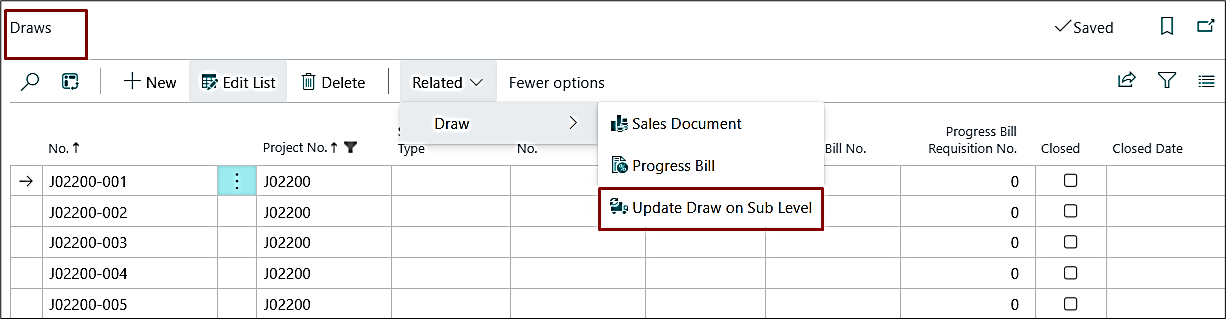
- A new “Update Draw on Sub Level” function is available on the Draws page when opened from the Project card.
- Clicking it syncs the selected open Draws to every sub-level project.
- Closed Draws cannot be synced.
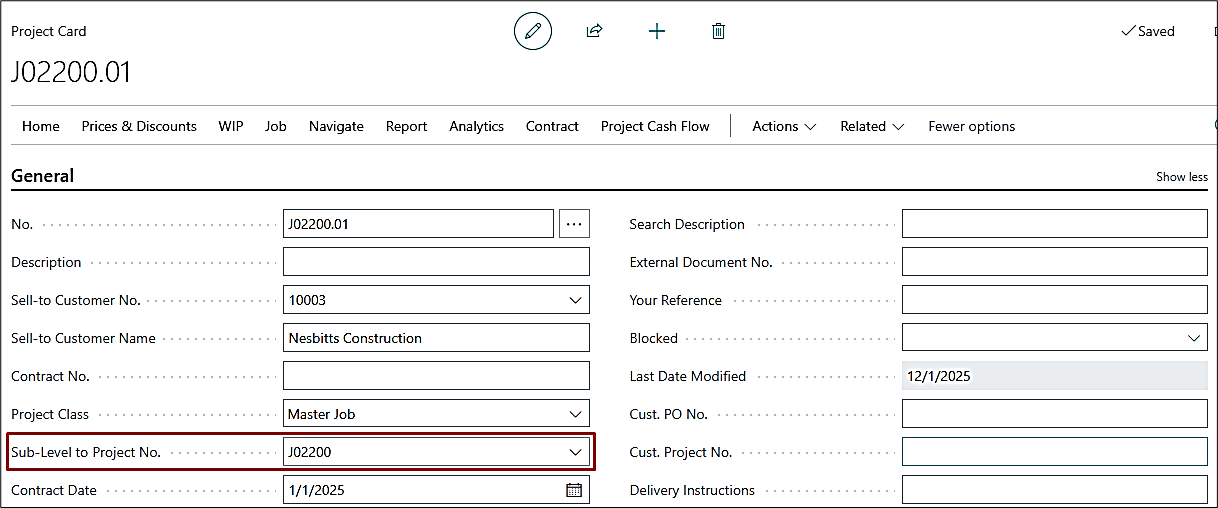
- If the “Sub-Level to Project No.” field is updated manually on the sub-level project:
- The system will sync all existing open Draws from the linked contract automatically.
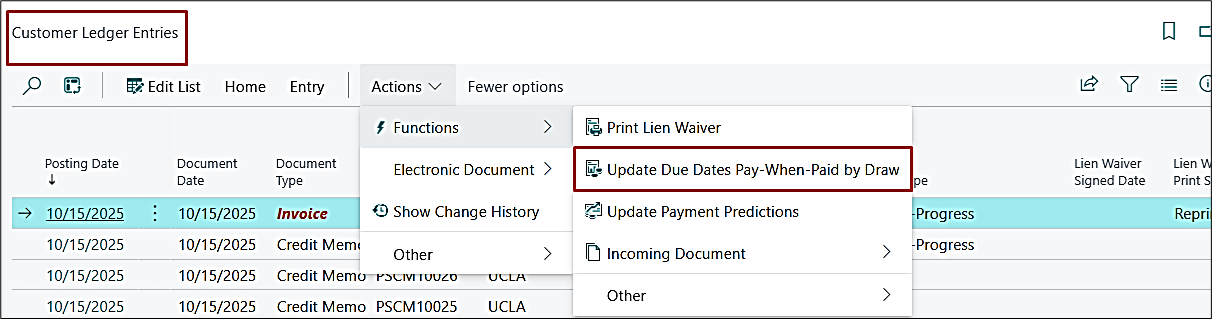
2. Batch: Update Pay-When-Paid by Draw on Customer Ledger Entries (CLE)
A new batch named “Update Pay-When-Paid by Draw” on the CLE and Customers List has been added.
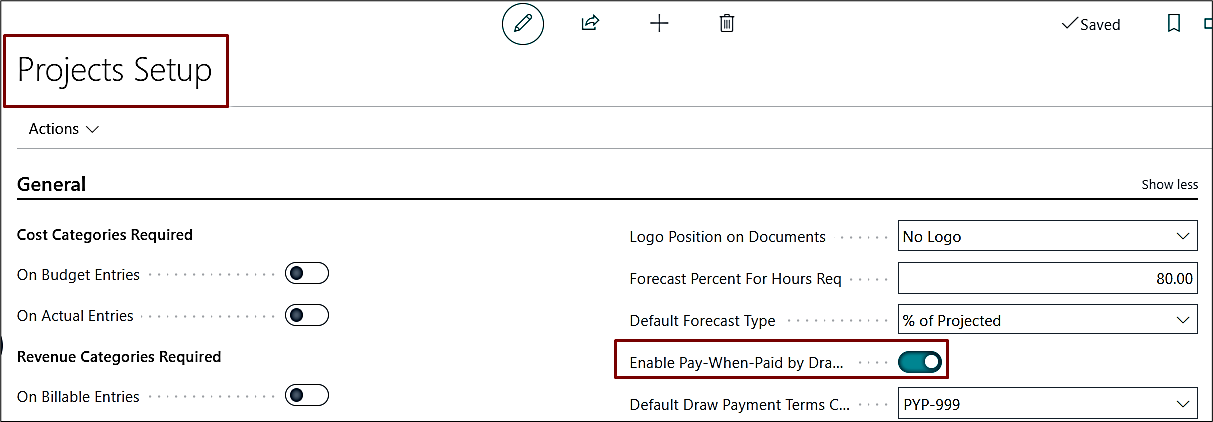
This batch is enabled through Project Setup using the field “Enable Pay-When-Paid by Draw No.”
3. Available Filters
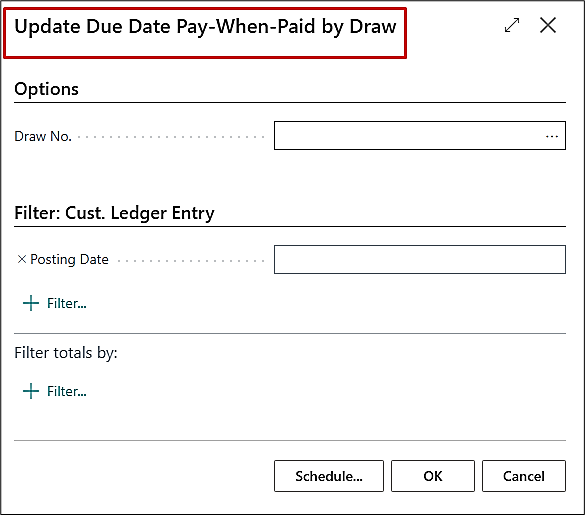
The batch can be run using two optional filters:
- Draw No. – This is used for running the batch for a specific open draw.
- Posting Date – This is used for including all open draw entries within a selected date range.
- Draw No. – This is used for running the batch for a specific open draw.
- Posting Date – This is used for including all open draw entries within a selected date range.
4. How the Batch Works
- Draw No. – This is used for running the batch for a specific open draw.
- The batch checks all Customer invoices and credit memos linked to the selected draw.
- If the total remaining amount = 0 (meaning the draw is fully settled),
- The system will update the Due Dates on the related open Vendor Ledger Entries (VLE).
- The due date will be updated to the latest payment posting date associated with that draw + Pay-When-Paid Term Code.
PE-756/ADO-999
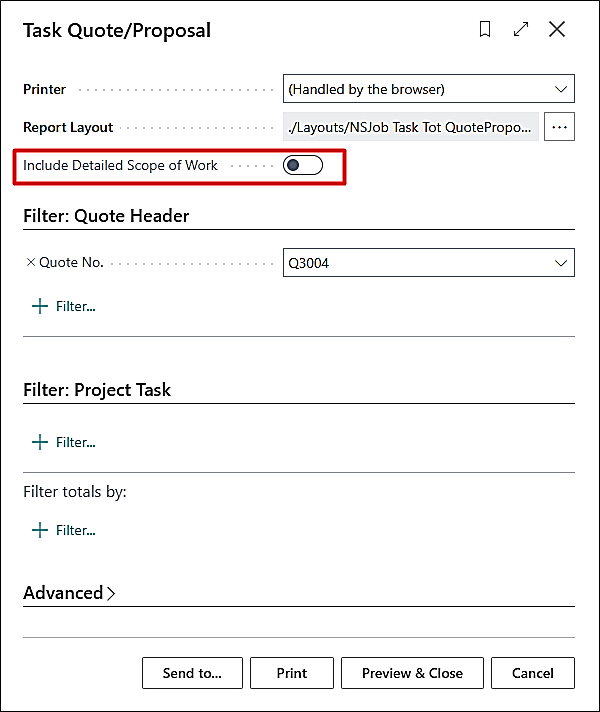
New Feature – Add "Detailed Scope of Work" on the Quote Reports
“Detailed Scope of Work” has been added to the Quote Reports below:
- Print by Task
- Print By Segment With
Enable the “Include Detailed Scope of Work” on the report request pages to print it on the reports.
PE-757/ADO-914
New Feature – New Column "Retention Posted Sales Invoice" on Progress Billings List
On the Project Progress Billing List, a new column has been added as “Retention Posted Sales Invoice”. The Posted Sales Invoice No. of the retention document, which is created via progress billing, will be shown here.
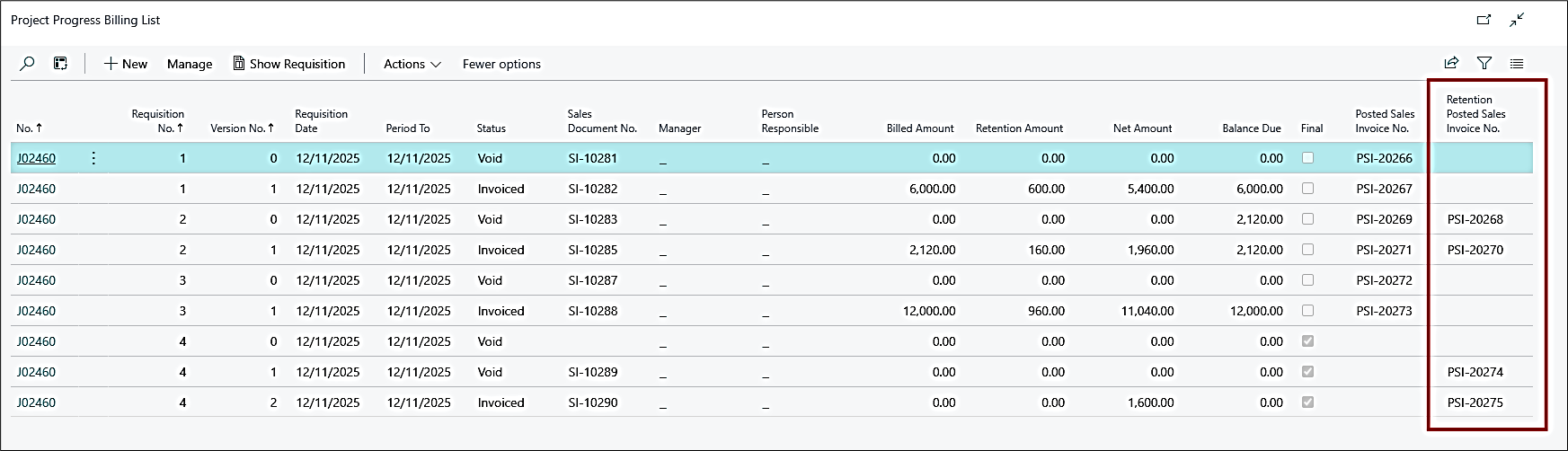
Note: This change applies prospectively.
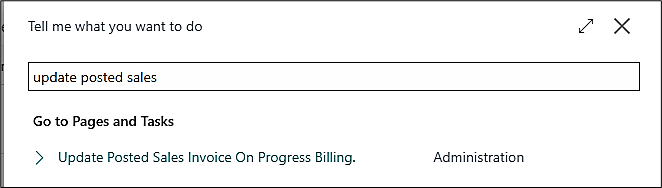
To apply this change to the existing data, a new batch has been created, which is available on the global search engine as “Update Posted Sales Invoice on Progress Billing”. Run this batch to update the existing data.
PE-759/ADO-1009
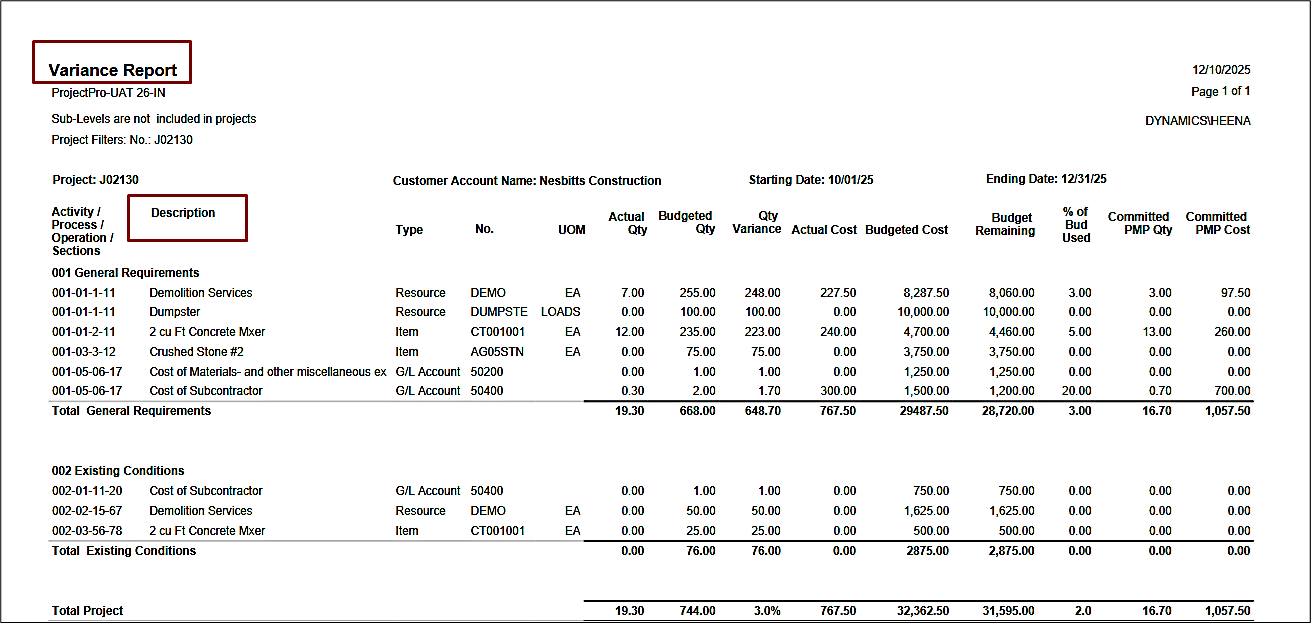
Enhancement – Print Item Name, G/L Name, Resource Name in Variance Report Description
Previously, in the Project Variance Report, the descriptions for Items, Resources, and G/L Accounts were not updated correctly and were instead repeating the APOS Task description.
Now, the report correctly retrieves and displays the descriptions from the Planning Lines rather than using the APOS Task description.
EP-763/ADO-1015
New Feature – Project Forecast on Sub-Level Projects
A new functionality is introduced to perform a forecast on sub-level projects. You can perform a forecast on a sub-level project by enabling the “Perform Forecast on Sub Projects”.
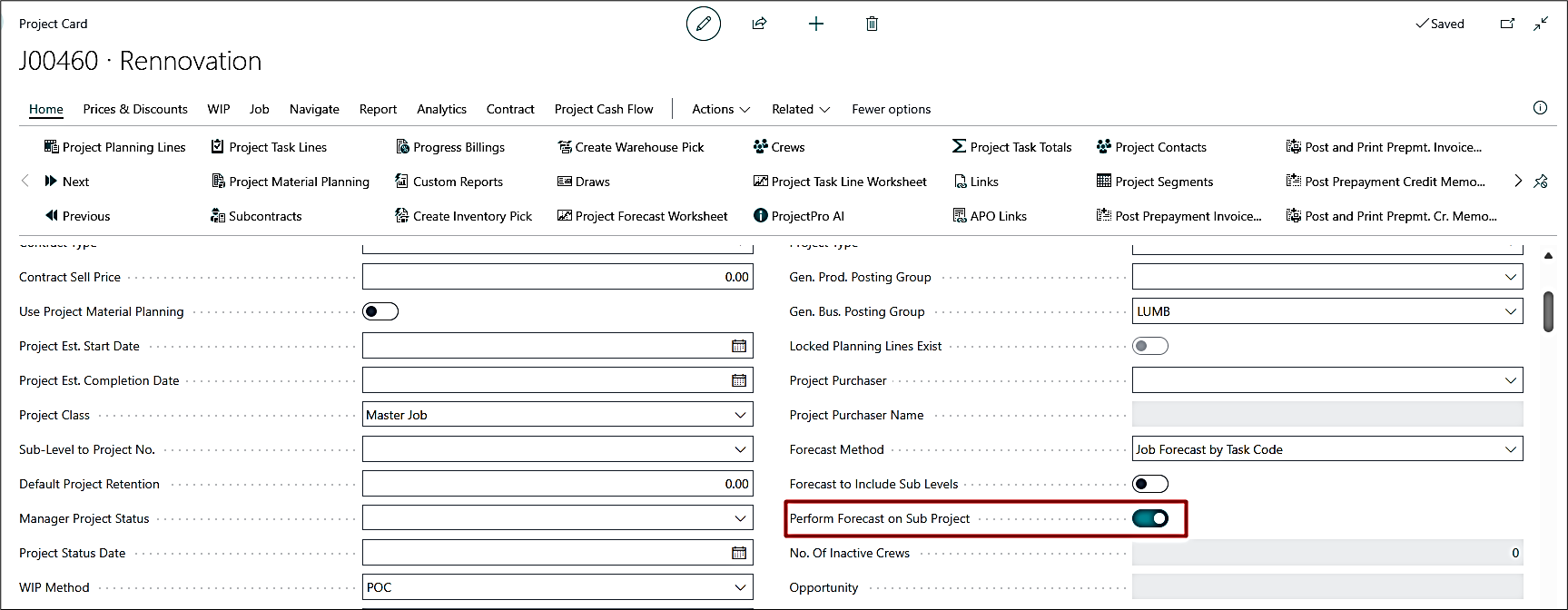
This can only be enabled on the Master Project. Enabling this will disable the “Forecast to Include Sub-levels”, since both features cannot be used together.
You can include sub-levels while performing a forecast on the sub-projects.
Note: This does not allow performing a forecast on Change Orders. This will only work if the “Forecast Method” is set to “Job Forecast by Task Code”.
PE-767/ADO-1109
Enhancement – Rounding G/L Conflict During Foreign Exchange Posting – Incorrect GL Impact
The system now correctly derives the Realised or Unrealised Gain/Loss Account from the Currencies page when posting cash receipts against an invoice. Previously, it incorrectly pulled the Rounding account from the Customer Posting Group.
PE-771/ADO-1126
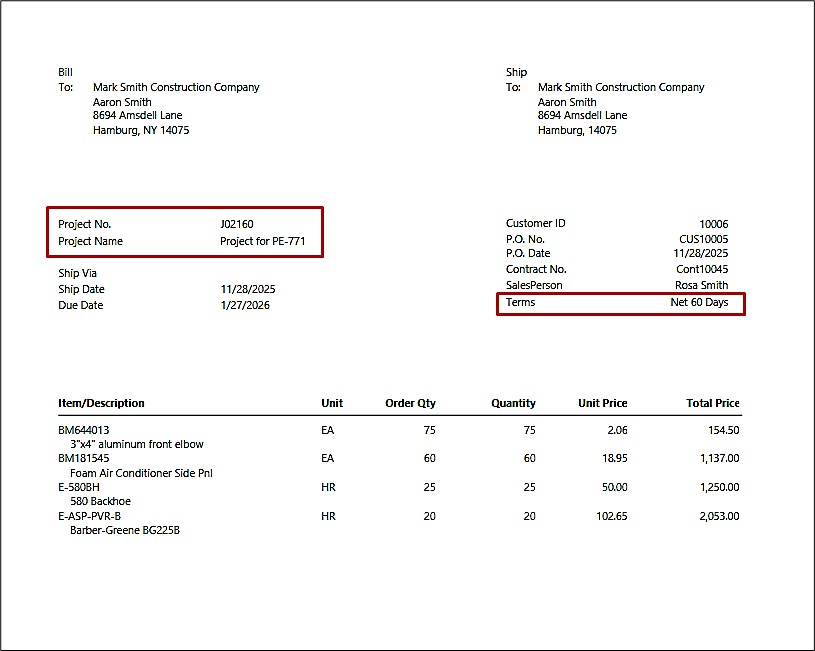
Enhancement – Enhance Project Sales Invoice Report (14021225)
Previous
- The Legal Identity field was present on the report.
- Project No. and Project Name fields were missing on the header.
- The Term field was not positioned at the right end.
Current
- The Legal Identity field has been removed.
- Project No. and Project Name fields are now added to the header.
The Term field has been moved to the right side of the report
PE-773/ADO-1150
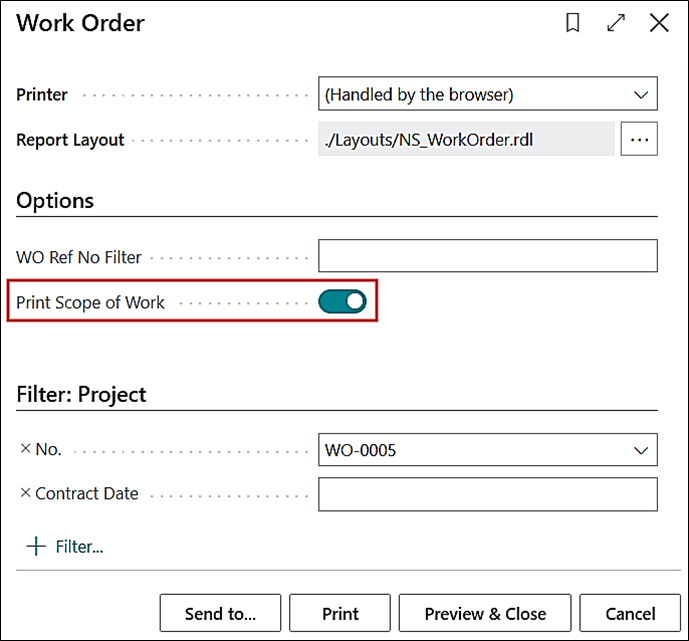
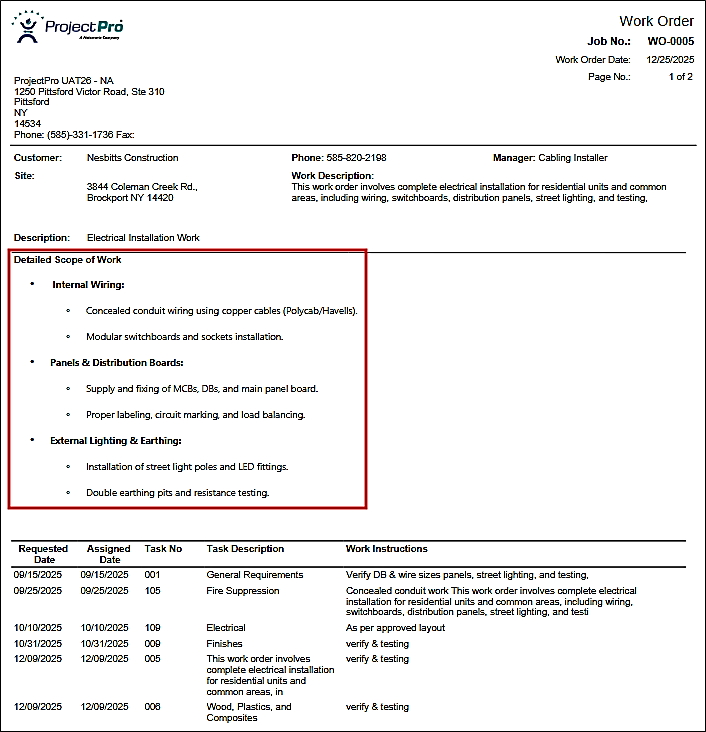
New Feature – “Scope of Work” on Work Order Report
The Work Order report has been enhanced to print the “Scope of Work.”
PE-775/ADO-1208
Enhancement – Warning in PMP – Copy Project Planning Lines
The warning message on the project material planning worksheet will not appear when clicking “Copy Project Planning Lines” for the blank worksheet or when creating it for the first time.
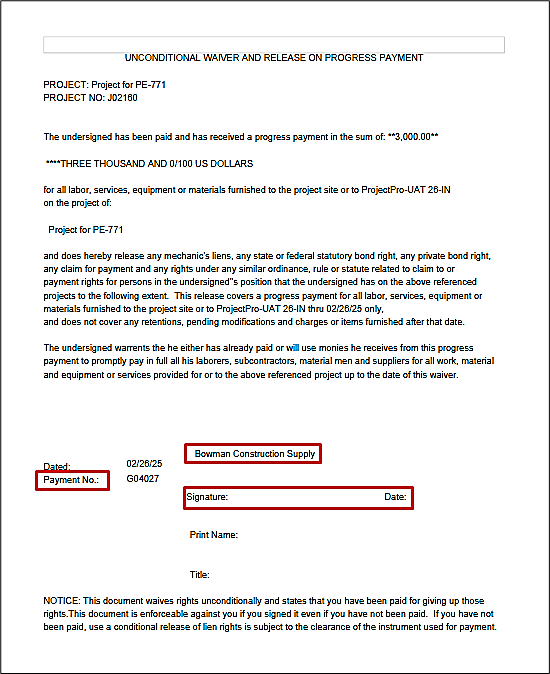
PRJCTPR-539/ADO-1044
Improvement – Vendor Lien Release Document - Printing "UNKONWN!!!"
Previous
- Vendor Name was showing as “Unknown”.
- Only the Check No. was displayed, regardless of the document type.
- The date field was placed in the original position with no room for signature.
Current
- The report now displays the Vendor Name correctly, instead of showing “Unknown”
- The date field has been shifted to the right to provide enough space for the signature area.
- The logic for displaying the caption has been corrected:
- If Document Type = Payment and a Check Ledger Entry exists, the Check No. is shown.
- If Document Type = Payment and no Check Ledger Entry exists*, the Payment No. is shown.
PRJCTPR-546/ADO-1154
Improvement – Customer Card - Field Value and Lookup for "Balance Without Retention ($)"
The system now shows the correct value under the "Balance Without Retention ($)" field in a case when the user bills in Foreign Currency.
PRJCTPR-547/ADO-1155
Hot Fix – Use "Get Receipt Line" after Receiving Subcontract Commitment
Issue
When a subcontract had multiple lines, the receipt was posted through Subcontract Commitment and invoiced using Get Receipt. After adding a new line to the subcontract, the system failed to create a PO for that line because of a Line No. mismatch.
Correction
The Line No. mismatch issue has been fixed. New subcontract lines can now be added and converted into Purchase Orders without errors
PRJCTPR-548/ADO-1146
Improvement – "Bill-to Customer Name" on Change Order Quote
The “Bill-to Customer Name" on the Change Order Quote will appear correctly now. Earlier, the “Address 1” was being populated to the field.
PRJCTPR-549/ADO-1204
Improvement – Dimensions on Quote - Template to Quote and Quote to Project
The Dimensions now flow correctly from:
- Package to Quote card and tasks
- Customer to Quote and tasks
- Quote to Project
- Quote Tasks to Project Tasks
PRJCTPR-550/ADO-1196
Improvement – Char Length on "Project Purchase Order Status" Report (14021184)
The character length for UOM on the “Project Purchase Order Status" report has been corrected.
PRJCTPR-554/ADO-1289
Improvement – Progress Payment - Increase Character Length for "Vendor Name"
The character length of the vendor's name has been increased to 100 for the Progress Payment process to align with the Business Central process.